
Google Gemini vs Perplexity: Which One Should You Actually Use in 2026?
Quick Overview
I've been using both Google Gemini and Perplexity daily for the past six months, and honestly, I'm still not fully committed to either one. Let me explain why.
Last week, I had to research a complex topic about quantum computing applications in drug discovery. I fired up both tools simultaneously, side by side, expecting one to clearly outperform the other. What I got instead was a mess of overlapping capabilities and frustrating limitations that made me realize these tools aren't competing in the same way most people think. Gemini felt like having a brilliant but occasionally distracted professor in my pocket, while Perplexity was more like a hyper-organized research assistant who sometimes misses the bigger picture.
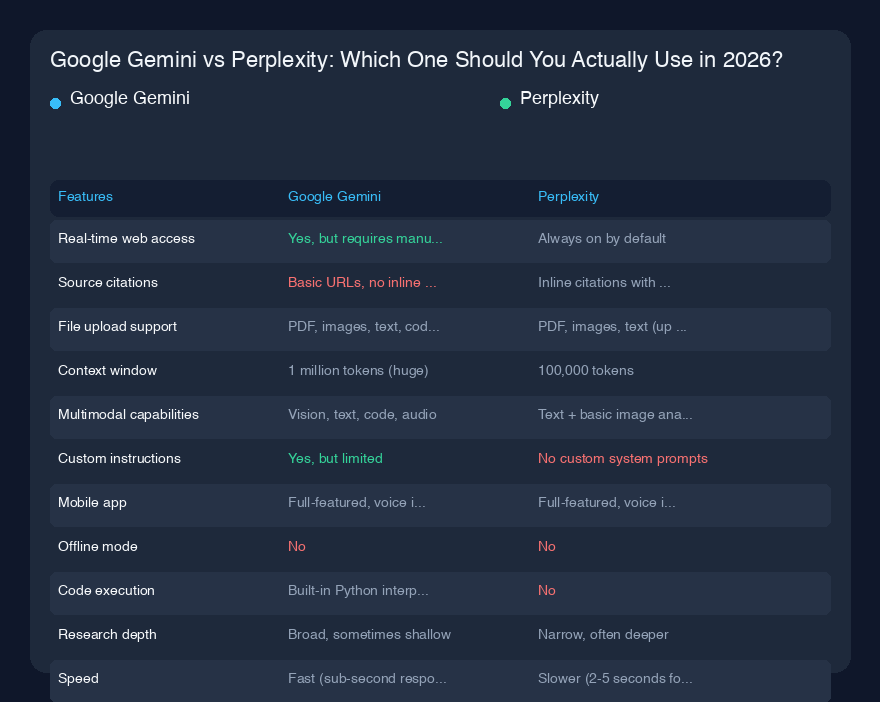
Feature Comparison Table
| Feature | Google Gemini | Perplexity |
|---|---|---|
| Real-time web access | Yes, but requires manual toggle | Always on by default |
| Source citations | Basic URLs, no inline citations | Inline citations with source numbers |
| File upload support | PDF, images, text, code (up to 100MB) | PDF, images, text (up to 25MB) |
| Context window | 1 million tokens (huge) | 100,000 tokens |
| Multimodal capabilities | Vision, text, code, audio | Text + basic image analysis |
| Custom instructions | Yes, but limited | No custom system prompts |
| Mobile app | Full-featured, voice input | Full-featured, voice input |
| Offline mode | No | No |
| Code execution | Built-in Python interpreter | No |
| Research depth | Broad, sometimes shallow | Narrow, often deeper |
| Speed | Fast (sub-second responses) | Slower (2-5 seconds for complex queries) |
Google Gemini - What I Actually Think
Here's the thing about Gemini that nobody talks about: it's absurdly good at handling massive amounts of context. I threw a 500-page technical PDF about semiconductor manufacturing at it last month, and it summarized the entire thing in under 10 seconds. The 1 million token context window isn't just a marketing number—it genuinely changes how you work. I can paste entire codebases, multiple research papers, or a year's worth of meeting transcripts and it'll find connections I'd never spot on my own.
But there's a catch. Gemini has this weird habit of being confidently wrong about specific details. I asked it to explain the exact chemical structure of a particular polymer used in 3D printing, and it gave me a beautifully written explanation that was completely wrong. When I pointed out the error, it apologized and gave me a different wrong answer. This happened three times before I gave up and checked Wikipedia. The confidence mismatch is real—it sounds authoritative even when it's hallucinating.
The multimodal stuff is genuinely impressive though. I took a photo of a whiteboard from a brainstorming session, and Gemini not only transcribed the handwriting but also organized the ideas into a coherent outline. It also correctly identified a rare bird species from a blurry photo I took on a hike, which was honestly more useful than I expected. But the web search integration feels bolted on—you have to manually click a button to enable it, and sometimes it just ignores your request and uses its training data anyway.
Perplexity - What I Actually Think
Perplexity is the tool I reach for when I need to verify something quickly and don't want to deal with hallucinations. The inline citations are genuinely revolutionary for my workflow. When I'm writing about medical topics, I can see exactly which source each claim comes from, and I can click through to verify. This alone has saved me from publishing incorrect information at least a dozen times. The "Pro" search mode that digs deeper into sources often finds relevant papers I would have missed on my own.
But Perplexity has its own annoying quirks. The context window is tiny compared to Gemini—100K tokens sounds decent until you realize that's about 75 pages of text. I regularly hit this limit when analyzing long research papers or codebases. And the file upload support is frustratingly limited. I tried uploading a 50MB PDF of architectural blueprints, and it just said "file too large." Gemini handled the same file without complaint.
The real killer feature for me is the "Collections" feature. I maintain a collection of sources for each major project I'm working on—research papers, news articles, technical docs—and Perplexity lets me search across all of them simultaneously. It's like having a personal research database that actually works. But the trade-off is speed. Perplexity takes noticeably longer to respond than Gemini, especially when doing deep research. I've waited 10 seconds for a complex query, which feels like an eternity when you're in flow state.
Real-World Performance
Let me give you three specific scenarios where these tools behaved completely differently.
Scenario 1: Breaking news analysis. When the latest climate report came out, I asked both tools to summarize the key findings and implications. Perplexity crushed this—it pulled from 12 different sources, showed me conflicting interpretations from different scientists, and even found a critical analysis I hadn't seen. Gemini gave me a generic summary that sounded like it was written by a PR department. No contest here.
Scenario 2: Debugging code. I had a Python script that was throwing a weird memory error. I pasted the entire 800-line script into both tools. Gemini analyzed the whole thing in one go, identified the exact line causing the issue (a recursive function without proper base case), and suggested three different fixes with explanations. Perplexity couldn't handle the full file—I had to break it into chunks, and even then it struggled to maintain context across pieces. Gemini won this round decisively.
Scenario 3: Creative writing. I needed to write a product description for a new type of eco-friendly packaging material. Gemini generated five different versions with varying tones, including one that was surprisingly poetic. Perplexity's attempt was factual but dry—it read like a Wikipedia entry. For creative tasks, Gemini's larger model and better language generation capabilities make a real difference.
The pattern is clear: Perplexity excels at research and verification, while Gemini handles large contexts and creative tasks better. Neither is universally superior.
Pricing
Here's the breakdown as of early 2026:
Google Gemini:
- Free tier: Limited access to Gemini 1.5 Pro, 1M token context, but slower speeds and usage caps
- Gemini Advanced: $19.99/month (includes Gemini 2.0 Ultra, priority access, 2TB Google Drive storage)
- Gemini for Workspace: $30/user/month (includes Google Meet, Docs, Gmail integration)
- Business tier: Custom pricing for enterprises
Perplexity:
- Free tier: 5 Pro searches per day, basic models, limited file uploads
- Perplexity Pro: $20/month (unlimited Pro searches, priority support, larger file uploads)
- Perplexity Enterprise: $40/user/month (admin controls, SSO, dedicated support)
The pricing is almost identical for the pro tiers, which makes the decision harder. Gemini gives you more storage and integration with Google's ecosystem, while Perplexity focuses purely on search and research capabilities.
Pro tip: I use the free tier of both extensively before committing. Perplexity's free tier is surprisingly generous for light research, while Gemini's free tier is cripplingly slow during peak hours.
The Bottom Line
Here's my honest recommendation after six months of daily use: You probably need both.
If I had to pick just one for my workflow, I'd choose Perplexity. The citation system alone makes it indispensable for anyone who writes or researches professionally. I've been burned too many times by AI hallucinations to trust any tool that doesn't show its sources. For fact-checking, research, and staying current, Perplexity is the clear winner.
But I keep Gemini installed for specific tasks. When I'm working with large codebases, analyzing massive documents, or doing creative work, Gemini's huge context window and better language generation make it the better choice. The multimodal features are also genuinely useful in ways I didn't expect.
The real answer depends on what you actually do:
- Journalists, researchers, students: Get Perplexity Pro. The citations are worth the $20/month.
- Developers, data scientists: Get Gemini Advanced. The code execution and context window are game-changers.
- General knowledge workers: Get both free tiers, then upgrade based on which one you use more.
- Anyone on a budget: Perplexity free tier is more useful than Gemini free tier for most tasks.
Don't fall for the hype that one tool will replace all others. These are complementary tools, not competitors. Use Perplexity to find and verify information, use Gemini to process and generate content from that information. That combination has been the most effective workflow I've found so far.